If I asked the average computer user “What part of a computer makes the biggest difference in speed?”, what do you think the answer would be? Most people would argue that the Central Processing Unit (or CPU) would determine that. And in a lot of cases, this might be correct – the CPU does determine how fast a computer gets basic jobs done… Others might say the amount of memory affects the speed. Once again, this is not bad information – after all, how much Random Access Memory (or RAM) you have influences the workload that your computer can handle. Back in the 90’s and early 2000’s, CPU designs were taking huge leaps ahead, and programs, even basic ones, were using more memory with every new version. That computer you bought even a couple years ago would soon feel sluggish and outdated, as technological improvements would continue to drive the market forward.
In the span of twenty years, computers have gone from the steam locomotive to the jet airliner in terms of how powerful and sophisticated they are. However, there is one component that everyone neglects – one that hasn’t grown at the same rate of speed as those above: the hard drive. Most modern hard drives are still very similar in design to their predecessors from the 80’s. Although they have continued to increase in storage space, modern hard drives haven’t gotten a whole lot faster. While most components of a computer are electronic in nature, a hard drive is still mechanical – it relies on physical moving parts and a spinning disk to read and write information. Every time your computer starts up, loads a program, or opens a file, the hard drive is tasked with finding and reading that data. Multiply this by thousands of individual files to be read and you can see where a slowdown occurs. The CPU and RAM don’t have this limitation – they can read similar amounts of data in the tiniest fractions of a second. We call this a bottleneck – where one slow car on the off-ramp leads to an entire traffic jam. Your computer can only go as fast as its slowest part.

So, what’s the solution for this? If manufacturers could make hard drives significantly faster, they would have. Competition drives innovation in the technological market. So, as propeller planes couldn’t go any faster, they invented the jet. A different type of drive altogether, the Solid State Drive (or SSD), has been around for a similar period of time as the Hard Disk Drive. However, they have only recently become inexpensive enough to be practical. Major companies have recently begun to see the advantages of using said types of drives. Apple has been using them as the standard drive of choice in the MacBook lineup for several years now, and Microsoft has been putting out advertising campaigns advising PC buyers to opt for systems with these drives.
For the vast majority of computer users, modern CPUs and RAM have been powerful and plentiful enough for some years now. While technological advancements have come to the these particular parts, the hard drive that supplies critical data has been the limiting factor. Even older systems can feel snappier and more responsive than their brand new counterparts when equipped with these new drives. And when the relic from 2009 can run circles around a computer 10 years newer, there should be no question as to which of your parts should get a face-lift.
A question we get asked fairly often is, “How long is my computer expected to last?”. While a fairly difficult question to answer with any certainty, we can often estimate it based on the system we’re looking at. In the case of some inexpensive models, replacement might come sooner rather than later, while pricier computers are often expected to earn their money’s worth. As any Mac owner probably knows, there are no “inexpensive models” in the Apple lineup, and many underestimate the longevity of their systems. Some people believe that they are missing out on something groundbreaking and new, while many more misread strange behavior from an aging system as signs of necessary replacement. Many factors can contribute to that feeling of “oldness” and some of them are more straightforward than others. We can help you by breathing new life into an old mac!
Space
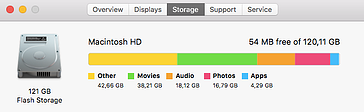
Large photo, video, and music collections are fairly prolific among Mac users, and we see far too often a Mac completely filled with such data. Macs have a long history of shipping with insufficient storage in the more basic configurations, and when every step up in storage adds another couple of hundred dollars to the price tag, we can be reluctant to invest in such things. However, doing so can save a lot of trouble in the long run: Having a hard drive too close to full can result in severely depreciated performance and responsiveness, even on newer Macs. If you manage to completely fill a drive, you might experience persistent notifications indicating such, as well as an inability to download updates or add new programs or data. Keeping a drive too full for too long can also shorten its life and contribute to further problems in the future.
Updates
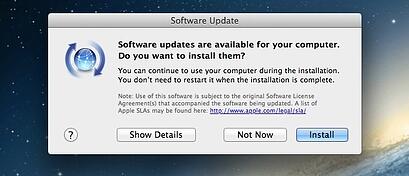
Although it’s often hardly a second thought on whether or not to update your devices, many people never update their Macs, either intentionally or, more often, unintentionally. Although staying completely up-to-date is not expressly necessary, getting too far out of date can result in certain applications failing to update themselves, or in more extreme circumstances, applications ceasing operation outright. A common example of this is when a Mac released in 2012 or before has never been updated, Safari, Google Chrome, and other web-browsing programs can no longer display certain websites properly, because the old version of Mac OS they’re running on has been discontinued. All software ceases support eventually as companies move their efforts to newer versions. When they do, continuing to use an older version can inevitable cause problems.
Speed and Responsiveness
This type of issue is often the most glaring of all – when your Mac takes forever and a day to get going, and then another eternity to do anything once it does. Having too many programs running at once, having insufficient storage, or just having a particularly slow hard drive can all contribute further to this feeling. This problem has a wide variety of causes and can be difficult to pin down, but once fixed, can make your Mac seem like brand new again. With a lot of old Macs, it’s also possible to upgrade them with more memory, larger hard drives, or fast solid state drives, sometimes even including options not available at the time of purchase. Technology is always advancing, and having even one hurt leg can make the fastest horse slow to a crawl.
The truth is, even systems nearing ten years old can still be useful and there is nothing inherently wrong with sticking with an older Mac. The type of Mac you have will obviously affect the solutions available to you, and we’ve put together a short list of some problems and potential fixes. You can check out our website at this link to see our compatibility list. When confronted with strange behavior or limiting factors, it can be very valuable to understand what might be happening and how such things can be overcome, especially when the impulse to “just get a new one” can run you more than a thousand dollars.
One of the situations we see far too often these days is when a user runs out of storage for their data. With digital photos and videos being taken at ever-higher qualities and resolutions, it’s most commonly a case where a person’s camera habits fill up their phone’s space. Even when that isn’t an issue, it’s very easy to simply install too many apps, buy too many movies, or have too many songs – and you’re back in the same predicament. It’s important to consider how much storage you should be looking for depending on your habits, and what types of storage options may fit your case best.
When it comes to smartphones, many of the major manufacturers have thankfully begun to increase the storage available in the base models of their flagships – which are the models most people purchase without a second thought. Even Apple, one of the longest holdouts, increased the storage on their base model iPhone to 32 GB with the iPhone 7. Major Android phones such as the Google Pixel or LG G6 also offer a base storage of 32 GB, or in the case of the Samsung Galaxy S8 or iPhone 8, a hefty 64 GB. To put things in perspective, during the days in which most phones were coming out with 16 GB of storage as the standard, between a quarter and a third of that was already occupied by the manufacturer’s default software straight out of the box. Factor in an HD movie or two, never-mind any apps, games, music, or photos – and you were already out of space. A few phones supported the option of expanding the storage with a Micro SD memory card, but most often the phones that needed this functionality most didn’t have it, and many of those that did went unutilized as people were not aware of the capability.
That brings us to the question – how much storage should you be looking for in a phone? Everyone uses their phone a little differently, so we will be going over a few scenarios we see most commonly…
If you’re the type of person who uses your smartphone strictly for phone calls, or you find yourself mainly browsing the web or checking your email, then look no further than the base offering of storage; none of these functionalities take up or benefit from having a lot of space, so you can feel free to save your money and go for the 16 or 32 GB options. Especially with the 32 GB option, even if you find yourself taking the occasional picture or video to share on social media, you should still be covered – just remember that even relatively infrequent usage can really add up over the two years or so that most people have their phones.
For those who find themselves reaching for the camera app more often than not, or those simply looking to watch movies or store large music libraries on their devices, it can be especially valuable to get extra storage. If you travel frequently, or simply love taking photos and videos, then a 32 GB option is probably a little too lacking for your needs. For these cases, a 64 GB option (or possibly even a 128) could make or break your camera or entertainment habits – especially with how much higher the quality (and thus storage needs) pictures, videos, and music have gotten. Considering many movies use up a few Gigabytes per hour of video at even lower qualities, it can be very easy to run out of space quickly. Items like individual photos or songs may not use up much space on their own, but when many people have thousands or even tens of thousands of such files, the impact can become apparent fairly quickly.
For more than a few out there, their smartphone has become their primary computer – they do nearly all their work, store much of their information, and organize much of their life with it. Some have a collection of data the likes of which dwarf even the previous scenario, and much of the time, they have an app list several pages long. We all know at least a couple people who fit this description, and who are always looking to expand their phone’s functionality with this app or that. For those people, the models with the largest storage available should be a consideration. In the case of many phones, the top models max out around 128 or 256 GB – more than sufficient for most of even the heaviest storage needs.
Finally, for all the cases listed above, it’s worth mentioning that your phone’s internal storage doesn’t need to (and shouldn’t) be the only form of storage your phone has access to. Cloud storage is ever popular among users of both iOS and Android devices alike, since it’s whole purpose is to be “available anywhere” that you have an internet connection. Getting a healthy amount of storage from Google’s Google Drive or Apple’s iCloud can not only ensure your data is safe in the event of damage or loss of your current phone, but can also help ease the transition from an old phone to a new phone when upgrading. Most plans are fairly inexpensive for an ample amount of space, to boot. Beyond this, both Google and Apple have been finding new ways to address the space problem in their phones by leveraging cloud storage as a means to take some of the burden of some of the most common files, such as photos and videos, off the devices themselves. iCloud and Google Photos, for example, can store the original, highest quality shots in the cloud and delete or store only a low-quality version that takes up less space on the phone itself, thus allowing you to view the original quality image on demand without having to sacrifice the space to accommodate it.
Many people today would find themselves lost without their smartphones, and a few practically run their whole lives with them. When two years have passed, it can be very easy to go to your cell carrier or local electronics store and simply pick up the first familiar option you see – but you should stop and think about it, first. Ask yourself questions: do you fit any of the scenarios above? How much space does your current phone have? Is it at its limit or have you barely scratched the surface? Depending on your answer, the question of which model is right for you can change. Even if you’re not sure how to check, this question should be one of the first you ask – most technicians can do so pretty quickly. As always, whether you’re stuck with a phone that’s almost full, or are simply trying to pick out a new one, RGB Computer Solutions is here should you ever need help or advice.
As many users of older Macs and PCs are probably aware, there is a rather finite amount of time most companies will continue to support their software products and operating systems. Long term support for older versions of software and operating systems can be hard to find.
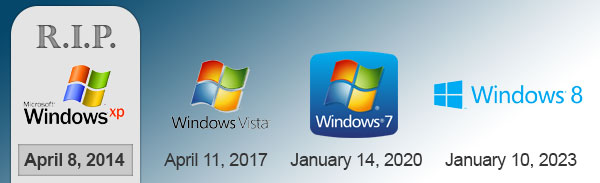
In the case of Microsoft, each version of Windows has a sort of “shelf life” that usually lasts around eleven years, during which time Microsoft moves from adding new features to just patching bugs and security problems. Eventually, the version reaches a point called “end of life”, wherein Microsoft releases one final update and then ceases work on the product.
Former Windows XP users are probably the most well aware of this, as XP still had a massive share of users when support for it ended in 2014. It was so widely used, that Microsoft had to extend their deadlines (twice!) to give time for the adoption of newer operating systems by XP users to reach acceptable levels. This has become relevant once again, as Windows Vista is the latest on the chopping block. Thankfully, not many people still use the ill-fated operating system, and most of its users have since moved to the more stable and well-designed 7, 8, and 10. However, there will definitely be some people left behind by this shift. Not to mention, a pretty large sum of people still use 7, which at the time of this writing has less than three years left. As with XP and Vista before it, once this deadline comes around, Windows 7 will stop receiving updates and security patches. These types of patches help keep people safe from major threats and security holes such as those exploited recently by the WannaCryptor Ransomware virus. Thankfully, with the advent of Windows 10, Microsoft has abandoned their previous release strategy, and are simply going to add new features to and update Windows 10 indefinitely.
On the Mac side, things aren’t so cut and dry. Apple does not exactly support older versions of Mac OS X, instead releasing major bug fixes for the current version between major releases. However, versions come out much more frequently than with Windows, with a new Mac OS 10.xx being released almost once a year. Not to mention, upgrades to the new versions are free, which is a move Microsoft has only made once, for users of 7 and 8 to move to Windows 10. Because every system running Mac OS is made by Apple itself, as well as the reasons listed above, Apple decides on update support by the Mac models instead.
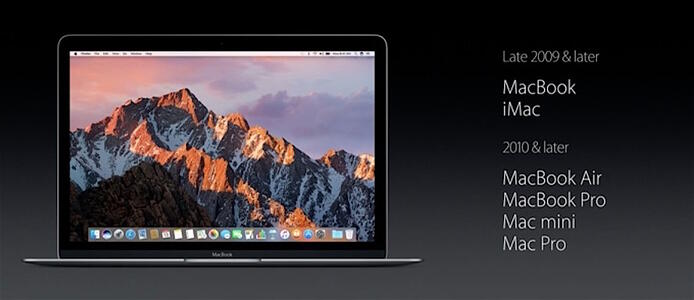
Sometimes there’s a very real limitation, either in technology or design, for Apple to cut out support on a new update for certain models. For example, when Apple switched to Intel processors over a decade ago, the new version of OS X released at the time wasn’t compatible with the older Macs running IBM chips. Similarly, several years later, certain Macs weren’t “64-bit” compatible – as a result, they too were left behind. In some cases, certain Macs might be supported by an update, but simply don’t have the specifications to handle it. This time, the decision seems to be a bit more arbitrary in nature. However the line has been drawn pretty clearly – No Mac made before the end of 2009 can update any further than 10.11 El Capitan.